Writing a prompt versus improving one#
The usual way to work on a prompt is to write some instructions, try a few examples, decide it looks better and ship it. A week later you do it again. You can't tell whether a change helped or just moved the words around until something breaks in production.
I think of LLM instruction work as two phases. In the first you write the instructions, and quality comes down to taste and judgement. In the second you find out whether they work, and quality is whatever the scoring function says. Plenty of people do the first. Very few instrument the second, and the second is the one that can run without you: once the scoring function exists, a loop can keep trying changes and keep the ones that score better, whether or not anyone is watching.
How it works#
You give it a skill file (a plain Markdown instruction set for an LLM), a set of test prompts and a scoring rubric, then leave it running.
Each round, it reads the weakest metrics from the last evaluation, makes one targeted change to the instructions with a stated hypothesis, generates fresh outputs with the changed version and scores them against your rubric. If the composite score improved, the change stays. If not, it rolls back. Then the next round starts.
Setup#
Setup takes about five minutes. An interactive wizard (python3 setup.py) asks you to pick an LLM provider and model, paste or describe the instructions you want to improve, define test scenarios, set a rubric (or use the defaults) and choose how long to run. It writes the config files, and you start the loop with claude -p program.md.
Design decisions#
One change per round. Each experiment is a single edit with a hypothesis behind it, so you can tell which change moved the score. You end up with a versioned history of what was tried and what stuck, which manual prompt work rarely leaves behind.
Two kinds of scoring. By default an LLM judge scores the outputs, but you can also write deterministic checks in Python that return hard scores. The included writing-style example ships with nine of them. You can weight the two together, so the judge handles what needs judgement and the rules handle what can be counted.
Bring your own model. It works with Gemini, OpenAI or Anthropic out of the box. Set the provider and model in config.yaml, add your API key to .env and it runs. Adding another provider is a single file edit.
Python optional. The other prompt-optimisation frameworks I looked at (DSPy, TextGrad, MIPRO) need you to write evaluation pipelines in code, which rules out a lot of the people writing prompts. AutoEvaluation runs from Markdown and YAML. Python only comes in if you want deterministic metrics.
The dashboard#
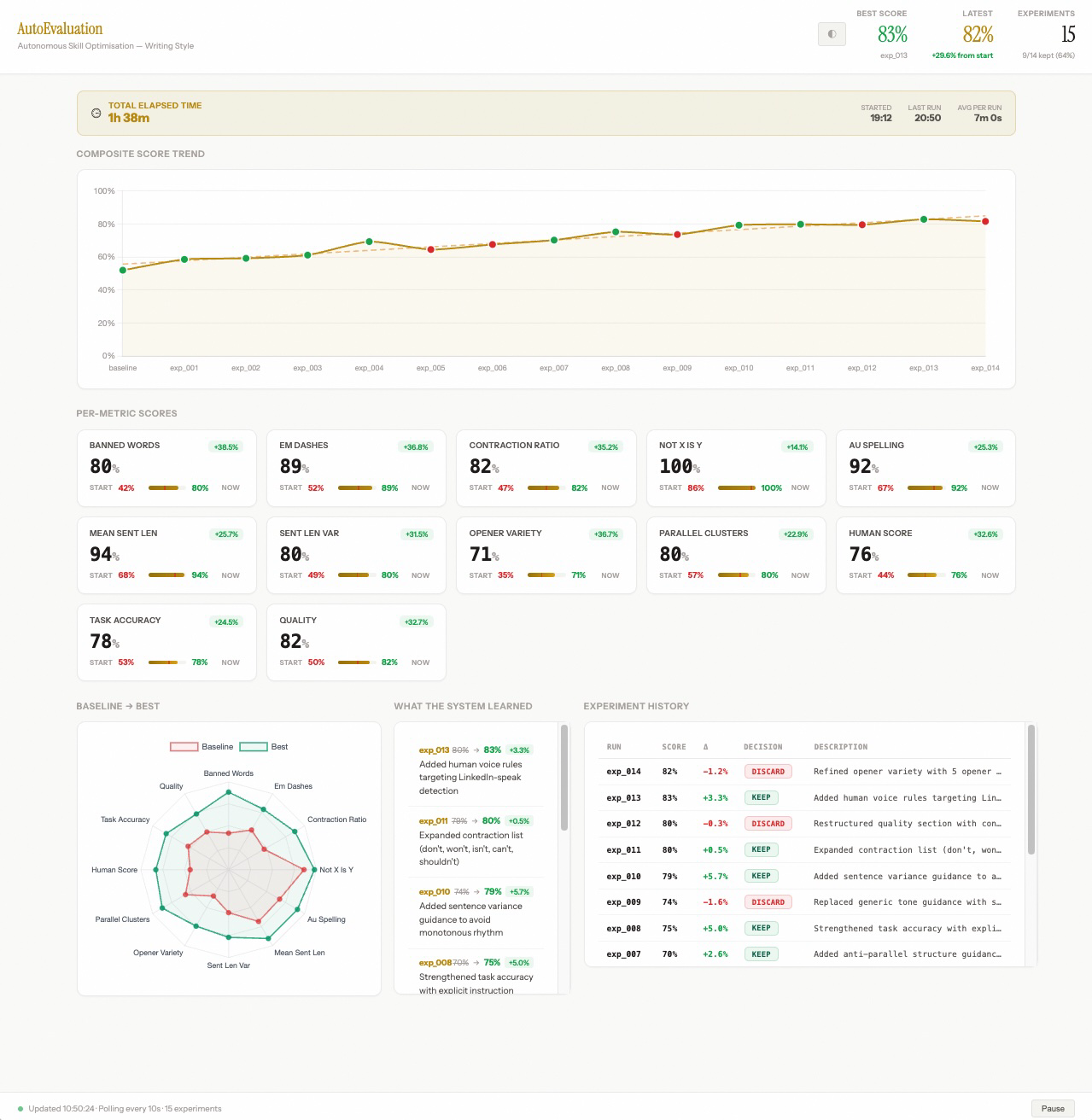
The screenshot uses demo data, so every panel is filled in. It isn't the result of a real run. Green dots are kept experiments and red dots are reverted ones. The score doesn't rise every round: some changes make things worse, and the loop reverts them without anyone stepping in.
To watch a run live, start python3 tools/dashboard_server.py in a second terminal and open localhost:8050. It updates as each experiment finishes.
Because the judge scores every output in a run, it can surface the rule that's broken most consistently across all of them. A human editor reading one output at a time rarely sees that pattern.
Pointing it at other prompts#
The same loop could point at other prompts: agent orchestration prompts, system prompts for customer-facing tools, even evaluation rubrics. You could run AutoEvaluation on its own judge instructions to improve how it scores.
The repo also has an always-on mode through GitHub Actions. Push to GitHub and the optimisation runs on a schedule you set (daily, every six hours, weekly), committing the updated skill and results back to the repo each time, so the prompt's history ends up in git.
Try it#
The repo is open source: github.com/AdenCJM/AutoEvaluation
It ships with a working example, a writing-style skill with nine deterministic metrics, so you can watch it run before pointing it at your own instructions.