Most people writing LLM instructions are missing half the job.
Everyone writes prompts now. You sit down, craft instructions, test a few examples, feel like it's better, and ship. Then you do it again next week. It's artisanal. It doesn't scale. And the worst part: you can never actually tell if you improved anything or just rearranged words until something breaks in production.
It comes down to a missing phase.
Working with LLM instructions has two phases: a creative phase, where you write the instructions, and an optimisation phase, where you find out if they actually work. Most people do the first. Almost nobody instruments the second. The optimisation phase is the one that compounds.
Two phases, one gap
In the creative phase, quality is subjective and progress is directional. You move the work forward through taste and judgement. The output of a good session is a better draft. There's no score. You just know.
In the optimisation phase, quality is defined by a scoring function. Progress is measurable. You run experiments, track what moves the score, keep the wins, discard the losses. The output of a good session is a higher number. You don't need to know; the data tells you.
The reason this matters: only one of these can run without you.
Creative work requires a person in the loop. Every improvement is a human judgement call. Optimisation, once you've defined the scoring function, can run autonomously. The loop doesn't care if you're sleeping.
How AutoEvaluation works
You give it a skill file (a plain markdown instruction set for an LLM), a set of test prompts, and a scoring rubric. Then you leave.
The system runs a four-stage loop. It reads the weakest metrics from the last evaluation run, then makes one targeted change to the skill instructions: a single edit with a stated hypothesis, not a rewrite. It generates fresh outputs using the modified skill, scores them against your rubric, and decides whether to keep or revert. If the composite score improved, the change sticks. If not, it rolls back. Then it goes again.
It hill-climbs your prompt while you do other things. Point it at a problem, go to bed, wake up with a better prompt.
Setup takes five minutes
An interactive setup wizard (python3 setup.py) walks you through everything: pick your LLM provider and model, paste or describe the instructions you want to optimise, define your test scenarios, set your evaluation rubric (or use the defaults), and choose a run duration. It generates all the config files you need. Then you start the loop with a single command: claude -p program.md.
Design decisions that matter
One change per iteration. Every experiment is a single hypothesis-driven edit, which keeps improvements attributable. You end up with a versioned history where you can see exactly what moved the needle and why. Manual prompt work usually produces none of that audit trail.
Two layers of evaluation. AutoEvaluation scores outputs using an LLM-as-judge by default, but it also supports custom deterministic metrics: rule-based checks you define in Python that return hard scores. The included writing-style example ships with nine of them. You can blend both layers with configurable weights, so you get the flexibility of LLM judgement alongside the precision of programmatic rules.
BYO model. The system works with Gemini, OpenAI, or Anthropic out of the box. Set the provider and model in config.yaml, add your API key to .env, and you're running. Adding a custom provider is a single file edit.
No Python required (unless you want it). Every other prompt optimisation framework I looked at (DSPy, TextGrad, MIPRO) requires you to write evaluation pipelines in code. That gates the tool behind a skill most people don't have. AutoEvaluation works entirely from Markdown and YAML. The Python layer is there if you want deterministic metrics, but it's optional.
Results from a live run
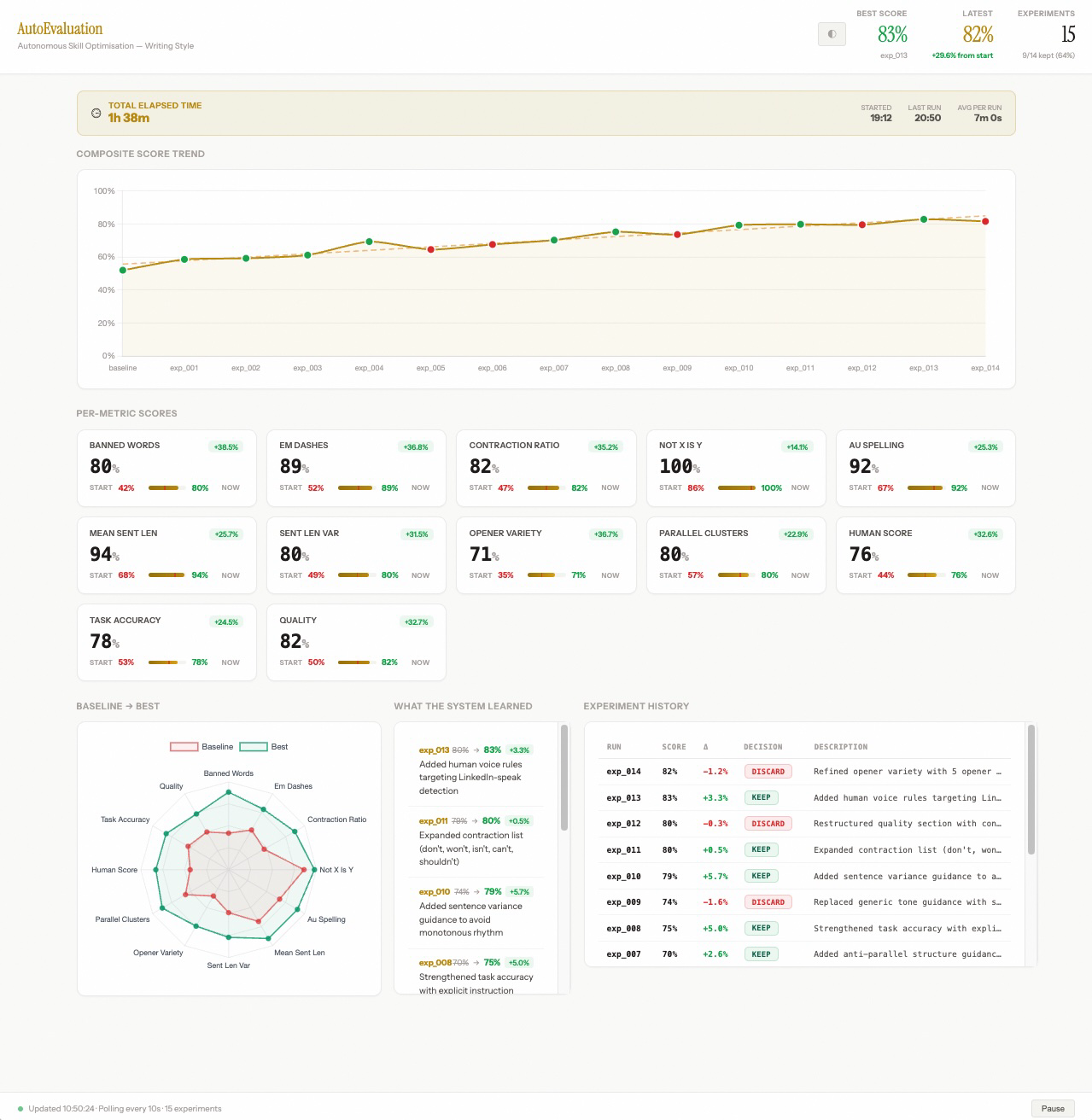
The trend line is what matters. Each green dot is a kept experiment, each red dot a discarded one. The score doesn't move in a straight line. Some attempts go backwards, and the system reverts them automatically. What you're watching is a search process, not a manual editing session. The human is entirely out of the loop.
You can watch this happen live. Run python3 tools/dashboard_server.py in a second terminal and open localhost:8050. The dashboard updates in real time as experiments complete.
Metric breakdown:
| Metric | Start | End |
|---|---|---|
| Banned word avoidance | 42% | 80% |
| Em dash removal | 52% | 89% |
| Australian spelling | 67% | 92% |
| Composite score | 58% | 83% |
9 of 14 experiments were kept. The score moved from 58% to 83%: a 25 percentage point improvement (43% relative to baseline), in under two hours, for the cost of a coffee.
The two changes that stuck in the most recent run: added human voice rules targeting LinkedIn-speak patterns, and expanded the contraction list with explicit examples. Both small. Both specific. Both the kind of thing a human editor might eventually catch, or might not.
That's the other thing the optimisation frame gives you: failure patterns at scale. A human editor sees one output at a time. The judge sees all of them at once and surfaces the most consistently violated rule. That's a different quality of diagnostic.
Where this goes
Once you can optimise a skill file autonomously, the next question is: what else can you point this at? Agent orchestration prompts. System prompts for customer-facing tools. Evaluation rubrics themselves. You could run AutoEvaluation on its own judge instructions and improve scoring quality over time. The loop eating itself in a useful direction.
The repo already ships with an always-on mode via GitHub Actions. Set it up, push to GitHub, and the optimisation runs on a schedule: daily, every six hours, weekly, whatever you configure. Each run commits the updated skill and results back to the repo. Your prompt improves over time in the git history without anyone touching it.
Infrastructure that runs in the background, continuously closing the gap between what your AI is supposed to do and what it actually does. Permanent, autonomous quality improvement on any instruction set you own.
Try it
The repo is open source: github.com/AdenCJM/AutoEvaluation
It ships with a working example (an anti-AI writing style with nine deterministic metrics) so you can see it run before pointing it at your own stuff. If you're working with LLM instructions of any kind and want to talk through whether this fits your problem, I'm easy to reach.